Manage test cases, execute runs, and report results — one platform your entire QA team will actually want to use.

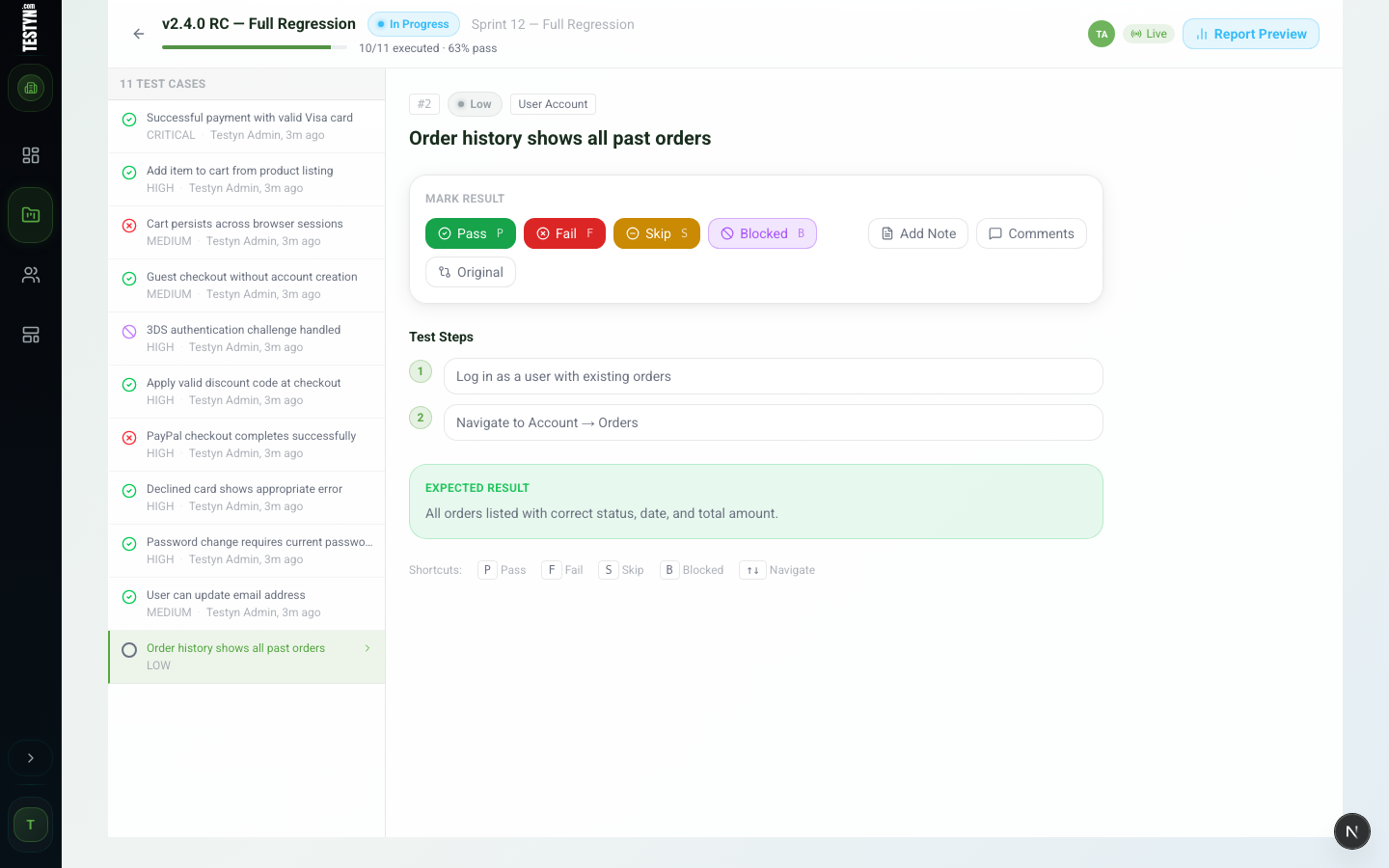
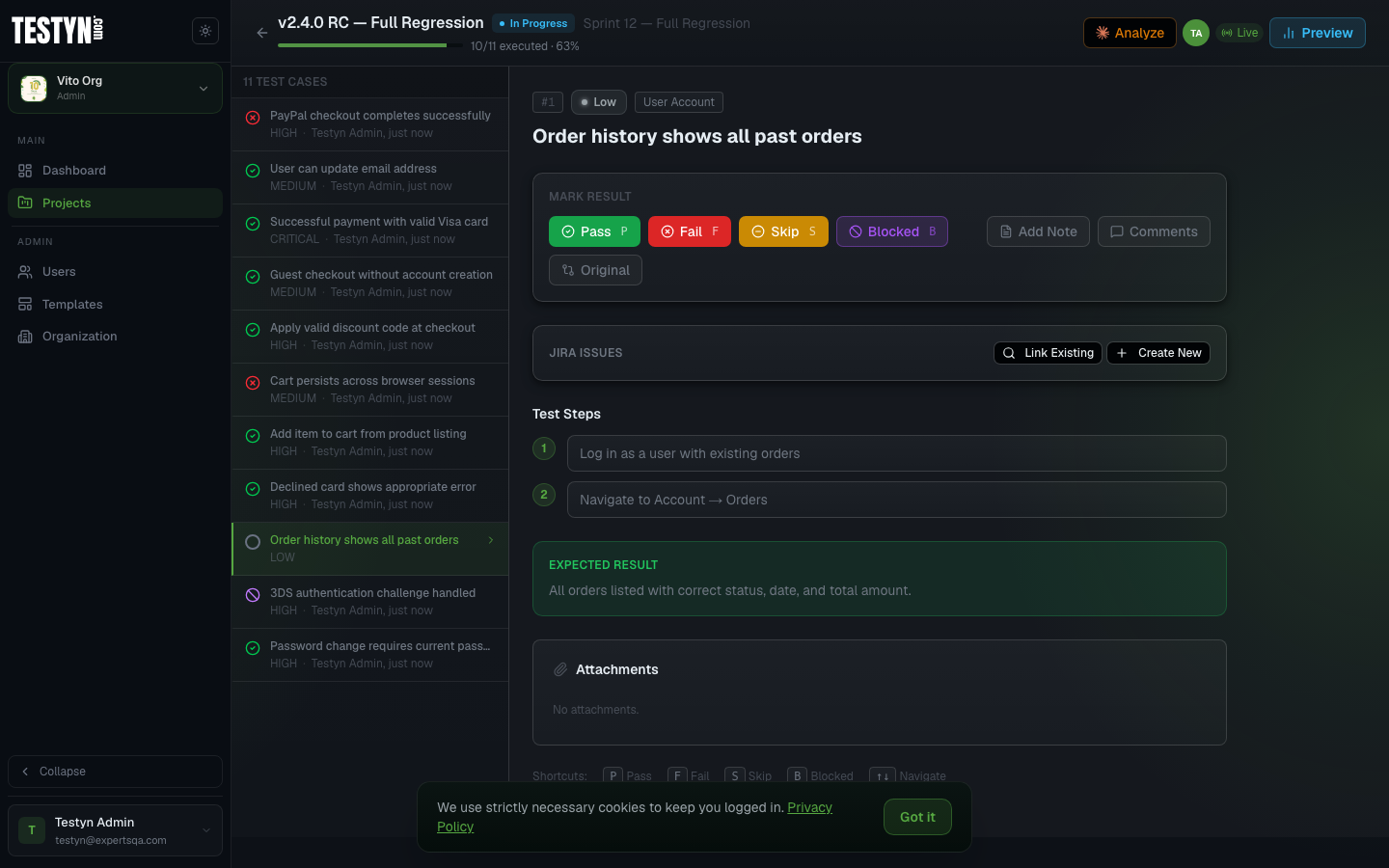
Step through test cases with your team, mark pass, fail, blocked, or skipped, and watch progress update live as everyone executes. No page refresh needed.


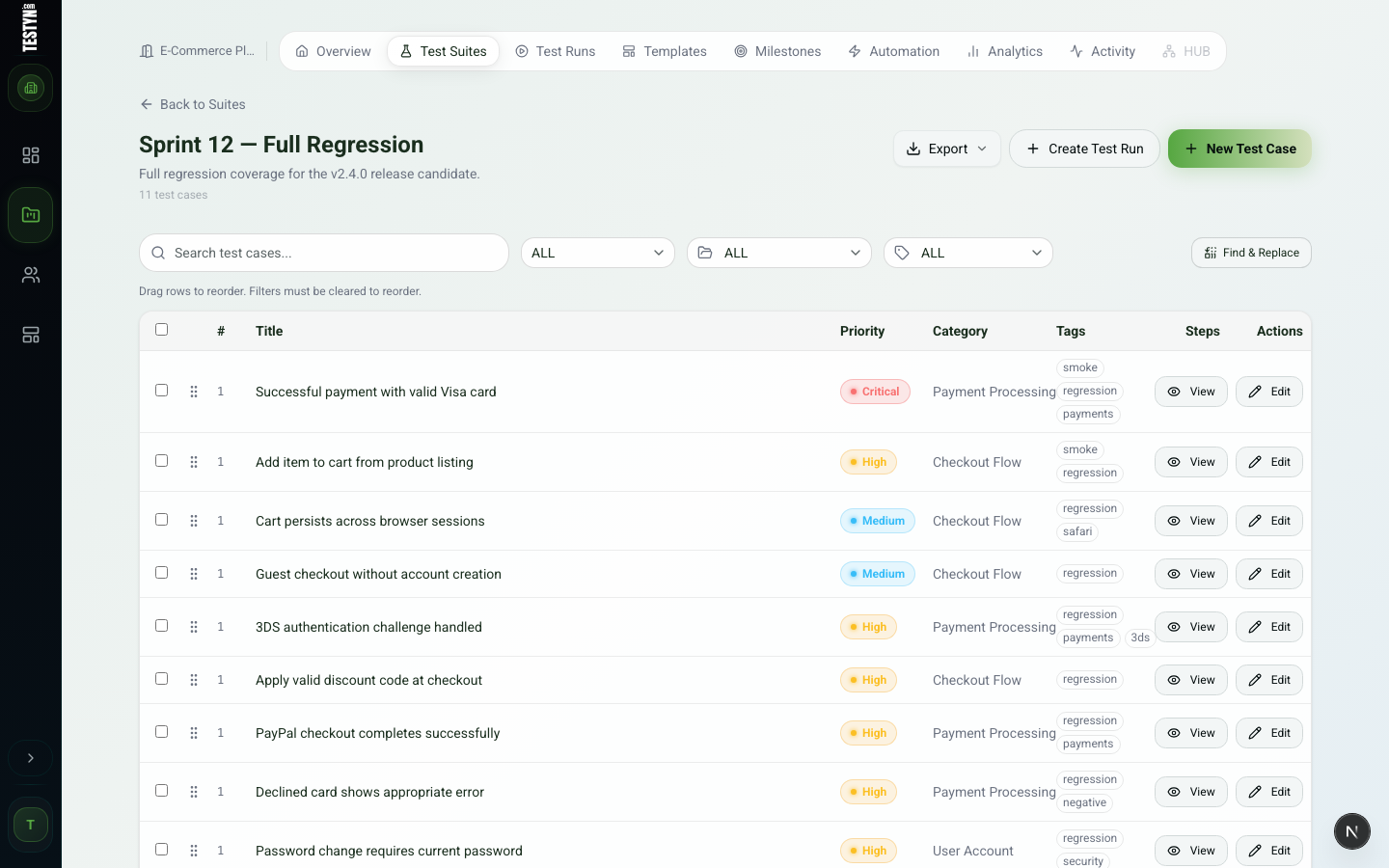
Build your test library from scratch or import from Markdown, Excel, or your existing testing tools. Prioritize, tag, and filter to find exactly what you need — instantly.
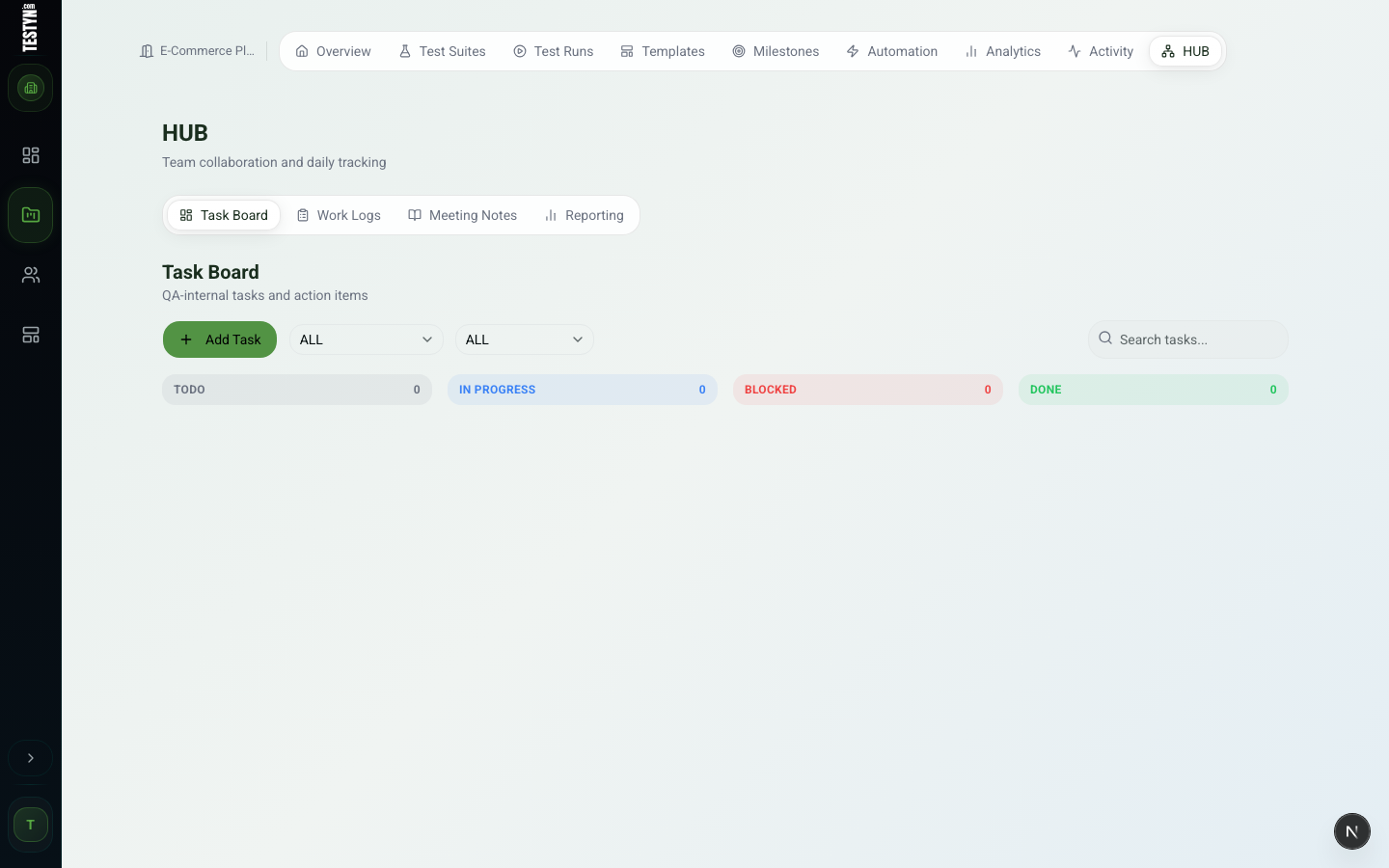
HUB is a built-in collaboration layer for every project — task boards, work logs, meeting notes, and reporting in one place, without leaving Testyn.
From per-run breakdowns to release-level pass rate trends — Testyn gives you the visibility to make confident shipping decisions.
Detailed per-run breakdown: pass/fail/blocked counts, per-case results with tester notes, and shareable links for stakeholders.
Aggregate results across all runs in a milestone. See release-level pass rates and coverage at a glance — ready for management reviews.
Track pass rate trends over time, test velocity, flaky tests, and tester activity across your project's history.
Purpose-built tools to streamline testing from case creation to reporting.
Organize, execute, and track every test case — from suite creation to run reporting.
Keep your whole QA team aligned with roles, comments, and a full activity trail.
Data-driven visibility from per-run breakdowns to release-level pass rate trends.
Migrate from your existing tools in minutes — no manual re-entry needed.
Your team's central view — all test suites, runs, and activity in one place.
Turn manual test cases into runnable Playwright, Cypress, and Robot Framework code.
Testyn plugs into the tools your team already uses — so bugs get tracked and nothing falls through the cracks.
Atlassian Jira Cloud
Connect your Jira Cloud project to Testyn and bring issue tracking right into your QA workflow. When a test case fails, link or create a Jira bug without leaving the test execution page — and see live issue status directly on your run reports.
Configured per project. Supports both API token authentication and OAuth 2.0. No context switching, no copy-pasting issue keys.
Link existing issues
Search your Jira project by key or keyword and attach issues to any test result.
Create bugs instantly
Open a new Jira bug pre-filled with the test case name, steps, and expected result — one click from the execution page.
Issue status on reports
Run reports show linked Jira issue keys and their current status. No tab switching to check progress.
Add comments
Post comments to linked Jira issues directly from the test result panel.
Per-project setup
Each Testyn project connects to its own Jira project. Settings are managed under Project Settings → Integrations.
API token or OAuth
Authenticate with a personal API token or use OAuth 2.0 for team-wide access.
Atlassian Jira Cloud
Connect your Jira Cloud project to Testyn and bring issue tracking right into your QA workflow. When a test case fails, link or create a Jira bug without leaving the test execution page — and see live issue status directly on your run reports.
Configured per project. Supports both API token authentication and OAuth 2.0. No context switching, no copy-pasting issue keys.
Link existing issues
Search your Jira project by key or keyword and attach issues to any test result.
Create bugs instantly
Open a new Jira bug pre-filled with the test case name, steps, and expected result — one click from the execution page.
Issue status on reports
Run reports show linked Jira issue keys and their current status. No tab switching to check progress.
Add comments
Post comments to linked Jira issues directly from the test result panel.
Per-project setup
Each Testyn project connects to its own Jira project. Settings are managed under Project Settings → Integrations.
API token or OAuth
Authenticate with a personal API token or use OAuth 2.0 for team-wide access.
Slack Incoming Webhooks
Keep your team in the loop without leaving Slack. Connect a webhook to any project and get instant notifications when a run fails, tests break, or a Jira bug is filed — right in your team channel.
No OAuth, no bot tokens. Paste a webhook URL in Project Settings, choose which events you care about, and you're done.
Run failure alerts
Get notified the moment a test run completes with failures — before anyone has to check.
Run completion
Optionally notify on every completed run, pass or fail, to keep the team synced on testing progress.
Individual test failures
Fire a message each time a single test case is marked as failed during execution.
Jira bug filed
Notify the channel when a Jira issue is created from a test result, with a direct link to the ticket.
Per-project webhooks
Each project has its own webhook URL and event toggles. No cross-project noise.
Block Kit messages
Rich, structured messages with project name, run stats, and a direct link back to Testyn.
GitHub Issues · Actions · Artifacts · OAuth
Connect your GitHub account to Testyn and link issues right from the test execution page. When a test fails, search your repo for an existing issue or create a new one pre-filled with the test case steps — without switching tabs. You can also trigger GitHub Actions workflows directly from a test run and pull build artifacts back into Testyn.
Each user connects their own GitHub account via OAuth. Repository is configured per project. Issue state (open or closed) is cached and refreshed automatically on run reports.
Per-user OAuth
Each team member connects their own GitHub account. No shared tokens or service accounts needed.
Search existing issues
Search your GitHub repo by keyword and attach any open or closed issue to a test result in one click.
Create issues instantly
Open a new GitHub issue pre-filled with the test case name, steps, and expected result — straight from the execution page.
Live state on reports
Run reports show a GitHub Issues column with issue numbers and open/closed state, refreshed automatically.
Trigger GitHub Actions
Dispatch a GitHub Actions workflow directly from a test run page. Select the workflow and branch, then track run status without leaving Testyn.
Pull build artifacts
Fetch artifacts generated by a GitHub Actions run — logs, reports, or binaries — and attach them to the corresponding test run in Testyn.
Shortcut Project Management
Connect your Shortcut workspace to Testyn and file stories directly from failed test results. When a test case fails, create a new bug, feature, or chore — pre-filled with the test case name — or search your workspace for an existing story and link it in one click.
Configured per project. Optionally, each team member can connect their own Shortcut API token so stories are filed under their personal identity. All tokens are encrypted at rest.
File stories instantly
Create a Shortcut bug, feature, or chore from any failed test result. The title is pre-filled and the story is filed in your configured workflow and team.
Link existing stories
Search your Shortcut workspace by keyword or paste a story ID to link an existing story to any test result.
Live story state
Linked stories show their current workflow state — Unstarted, In Progress, or Done — refreshed on demand from the Shortcut API.
Per-result view
Linked stories appear directly on the test result panel and in run reports, so the team sees defect status without switching tools.
Per-user token
Each tester can connect their own Shortcut API token so stories are filed under their identity. Falls back to the project token if no personal token is set.
Per-project setup
Each Testyn project connects to its own Shortcut workspace and workflow. Managed under Project Settings → Integrations.
Powered by Claude Sonnet
Connect your Anthropic account to Testyn and bring AI assistance right into your QA workflow. Generate new test cases from plain-language prompts, improve existing ones for clarity and precision, and get instant analysis of run failures — all without leaving the platform.
Connected per user. Each team member links their own Anthropic API key in profile settings. Your key is encrypted at rest and never shared with other users.
Generate test cases
Describe what you want to test in plain language. Claude writes 3–5 ready-to-use cases for any suite, avoiding duplicates with what you already have.
Improve test cases
Open any existing test case and click Improve. Claude rewrites the title, steps, and expected result with better clarity, specificity, and precision.
Analyze run failures
After a run completes, get a structured analysis: overall health assessment, failure patterns, risk areas, and specific next steps — generated from the actual results.
AI Chat assistant
Ask anything about test strategy, coverage, or QA best practices in a multi-turn chat scoped to your project's suites and structure.
Per-user API key
Each team member connects their own Anthropic account. No shared credentials or org-level tokens.
Encrypted and private
API keys are encrypted at rest. They are never exposed in logs, responses, or shared across accounts.
Sync test results with Azure Boards and Pipelines.
Sign up and set up your organization. Invite your team and assign roles for each project.
Build suites manually or import from your existing tools. Organize cases with folders and tags.
Launch test runs, capture results as you go, and share polished reports with stakeholders.
We spent years running test cases in spreadsheets and paying hundreds per seat for tools that looked like enterprise software from 2009. Every time we needed something simple — a run report, a reusable template, a milestone summary — it took three clicks too many.
So we built Testyn. A QA platform that's fast, opinionated, and affordable. One that the whole team will actually open every morning — not dread.
No investors. No bloated roadmap driven by enterprise sales. Just engineers building the tool they always wanted.
Testyn is built and maintained by ExpertsQA — a team of QA engineers and consultants.
QA tools should get out of your way. Not add three new meetings to your sprint just to learn them.
Good QA is a competitive advantage. Every bug caught before release is a customer kept — and a late night avoided.
Your test management tool shouldn't cost more than your cloud bill. QA teams deserve great software at a fair price.
Every feature should earn its place. Everything in Testyn exists because a QA engineer asked for it — including us.
Testyn is built by a small team that genuinely cares about QA workflows. You talk directly to the people who build it — no support tickets, no bots.
Whether you need help getting your team set up, want a custom import format, or have a feature idea that would make your workflow 10× better — reach out. We act fast.
Send us a message
Opens your email client with the message pre-filled. We typically respond within 24 hours.
Join QA teams that ship software with confidence. Free to get started — no credit card required.
Create free account